

Most e-commerce brands using GA4 miss subscription renewals entirely—these server-side transactions never trigger web events, so GA4’s standard setup ignores them. Treating renewals like new purchases in your analytics is a mistake: browser-based tracking won’t catch recurring payments handled by Stripe, Recharge, or your billing platform’s backend. This breaks revenue attribution, cohort analysis, and LTV calculations.
By the end of this article, you’ll know how to send subscription renewal events directly to GA4 using the Measurement Protocol, map them to your user identifiers, and avoid double-counting or privacy violations. You’ll see where GA4’s model falls short and what’s realistically possible with server-to-server tracking.
Why GA4 Misses Subscription Renewals by Default
GA4’s standard ecommerce tracking expects events to originate from browser-based user interactions. When a customer places their initial subscription order, the browser fires a purchase event—either via gtag.js, Google Tag Manager, or a native integration. This flow depends on a user session and a client-side script running in the browser at the moment of checkout.
Recurring renewals, in contrast, are handled server-side. Platforms like Shopify, Recharge, and Stripe process the payment, update order records, and send confirmation emails, but these actions occur without any browser present. No user is clicking a button or loading a page. As a result, the default GA4 tags and scripts never fire for these subsequent charges.
Shopify’s native GA4 integration logs only the initial transaction. Recharge and Stripe do not natively connect renewal events to GA4, and no webhook or postback in their dashboards sends an event directly to Google’s analytics endpoint. Unless you build a custom server-side integration, renewal revenue and associated data never reach GA4.
This omission distorts your analytics. LTV calculations reflect only first purchases, undercounting true revenue per user. Retention and cohort analyses misclassify active subscribers as churned, since their renewals are invisible to GA4. The impact extends to CAC modeling, payback calculations, and any report that relies on accurate customer lifecycle data.
If you only see one purchase event per subscriber in GA4, but your billing platform shows recurring charges, your setup is missing renewals. Check your GA4 event logs for repeat orders against your subscription system. If they don’t match, server-side or Measurement Protocol tracking is required.

How to Capture Renewal Events Without a Browser
When a subscription renews without user interaction—no pageview, no browser present—client-side tracking cannot see it. You must inject events server-side. GA4’s Measurement Protocol is the supported method. This protocol receives HTTP POST requests from your server, representing events that would otherwise come from the browser.
To send renewal events, construct a POST request to the Measurement Protocol endpoint. The required payload fields include client_id (or user_id if you maintain your own identifier), events as an array, and timestamp_micros if you need to backdate the event. The event name should match your naming conventions, for example, subscription_renewal. GA4 expects parameters like currency, value, and items for purchase-related events. If you omit these, reporting may be incomplete or misleading.
User identification is a core challenge. If your platform issues a user_id that matches the one sent from your front-end, use it. For client_id, you need to persist the GA4 web client ID at initial signup—typically by storing it in your user database—and fetch it when the renewal triggers. If you send mismatched or missing IDs, GA4 will treat each renewal as a separate user, breaking attribution and lifetime value analysis.
Event timing matters. If you process renewals in batches or with delays, set timestamp_micros to reflect the actual charge time. This keeps GA4’s session and funnel logic accurate. For troubleshooting, inspect the Realtime and DebugView reports in the GA4 UI. If renewals do not appear, check your server logs for HTTP response codes from the Measurement Protocol endpoint and verify required fields are present in each payload.
Implementing GA4 Measurement Protocol for Subscription Renewals
Start by obtaining your GA4 Measurement ID and API secret. In the GA4 admin UI, go to Admin > Data Streams, select your stream, and copy the Measurement ID (format: G-XXXXXXXXXX). For the API secret, under Admin > Data Streams > Measurement Protocol API, generate and save a new secret. Both are required for server-to-server event calls.
Set up a secure backend process to trigger when a subscription renewal succeeds. This process should not be exposed to the public internet. On each successful renewal, have your server assemble the event payload. Choose the GA4 event name intentionally: use purchase if the renewal should appear as a standard transaction, or a custom event name if you want to separate renewals from first-time orders in reporting.
Map the renewal data to GA4 fields. The purchase event expects currency, value, and an items array. Each item in the array should include item_id, item_name, quantity, and price. Reference the current GA4 ecommerce schema documentation, as required fields and naming conventions can change.
Send user identifiers to support attribution and deduplication. If you have a stable internal user ID, pass it as user_id. If you can persist the GA4 client_id from the user’s first browser session, include it as well. If you lack client_id, attribution to source/medium will be limited. Always validate that identifiers are formatted correctly—incorrect or missing IDs cause GA4 to treat renewals as new, unattributed users.
Monitor your implementation by checking GA4’s DebugView (for real-time events) and Events reporting. If renewal events do not appear within a few hours, review your server logs for HTTP 2xx/4xx/5xx responses from the Measurement Protocol endpoint and check for schema validation errors in the GA4 UI.
User Identification and Attribution Challenges
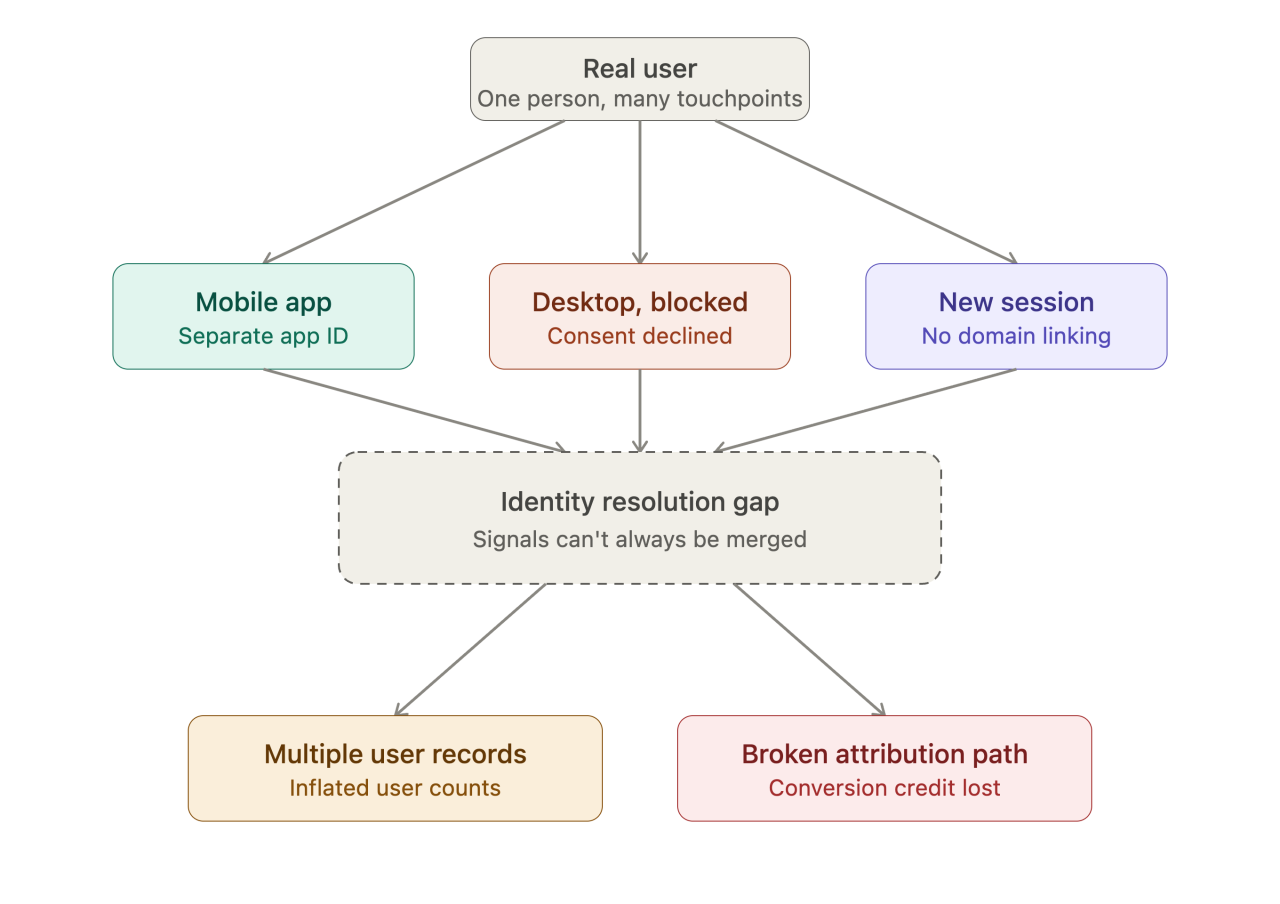
Renewal transactions rarely have a browser context, so you don’t get a client_id from the client. GA4’s Measurement Protocol expects either a client_id or a user_id. For subscription renewals, user_id is the only stable identifier—if you have it. You must generate and persist a user_id at the initial sign-up, then associate it with every renewal event sent server-side. Without user_id, GA4 treats each server-side event as a new anonymous user, and you lose cross-session attribution.
If you can’t provide user_id, renewals will show as isolated “direct” sessions. No campaign, source, or medium data will attach unless you explicitly send these fields in your Measurement Protocol payload. But for renewals, there’s rarely a meaningful source or campaign—these are not triggered by marketing touchpoints. You can pass the original acquisition parameters if you persist them in your backend, but most brands don’t capture this at sign-up. If you do have this data, include campaign, source, and medium fields in your event payload, but expect GA4 to attribute future renewals to the most recently sent values, not the original session.
To check if your renewals are missing attribution, search for renewal events in GA4’s DebugView and standard reports. If you see renewals attributed to “(direct) / (none)” or as new users each time, you are not passing a stable user_id or campaign details. There is no workaround in GA4 for retroactively fixing attribution on server-side events without these identifiers.
Validation, Deduplication, and Privacy Considerations
Use GA4 DebugView to validate that your server-side renewal events reach your GA4 property. In the GA4 interface, open DebugView and send a test renewal event from your server environment with test identifiers and timestamps. The event should appear in near real-time. If you do not see the event, verify your Measurement Protocol request payload, API secret, and property ID. For low-level troubleshooting, inspect outgoing POST requests to https://www.google-analytics.com/mp/collect using your server logs or a proxy. Check the HTTP status response—2xx means accepted, 4xx or 5xx indicates a problem with your payload or credentials.
To avoid double-counting, ensure that browser-based tracking does not also send a purchase or renewal event for the same transaction. Use a unique transaction or order ID in the event_params of your renewal event, such as "transaction_id": "R1234567". GA4 deduplicates purchase events by transaction_id if both browser and server send the same value. Confirm that your server-side and browser-side implementations generate and use the exact same ID format for renewals. Audit your event stream in the Events report to verify that each renewal shows only once per transaction ID.
For CCPA/CPRA compliance, limit the user data you send in Measurement Protocol payloads. Do not include directly identifying information (such as email addresses or full names) in clear text. Use GA4’s user_id field for pseudonymous identifiers, and process opt-out requests promptly. Review your payloads and logging practices to ensure you are not retaining or transmitting more than necessary. If you process California resident data, maintain a mechanism to suppress event sending for opted-out users.
Store your Measurement Protocol API secret on your server, never in any client-side code or public repository. Restrict access to the secret using environment variables or a dedicated secrets manager. Rotate the secret periodically and update your deployment process to prevent accidental exposure.
Limitations and What GA4 Still Won’t Tell You
GA4 cannot reconstruct a user’s full journey when renewals are tracked server-side only. If the original browser session set user_id or a client_id, but you can’t reliably pass these values with each renewal event via Measurement Protocol, GA4 treats renewals as disconnected from the original user. This breaks attribution and means retention, funnel, and LTV metrics in GA4 will be incomplete or misleading for subscription customers.
Retention and funnel reports undercount when user_id or client_id is missing or inconsistent. GA4’s user-based analysis depends on linking every event for a customer to the same identifier. If your server-side process can’t always retrieve or match this data—common when a subscription processor doesn’t expose the original identifiers—these renewals show up as new users or aren’t linked to any acquisition source. To check if you’re losing linkage, review the User Explorer in GA4 and compare the frequency of renewals with and without identifiers. A high proportion with null or duplicate user_id signals a gap.
Some subscription platforms restrict access to renewal event data or webhooks. If your provider only exposes initial purchase events or delays webhook delivery, your server-side tracking will miss or lag on renewals. Audit your subscription platform’s API and webhook documentation for data fields, delivery timing, and event availability. If you can’t get event payloads for each renewal, you can’t track them in GA4, regardless of Measurement Protocol setup.
GA4 is not built for subscription analytics. LTV curves, cohort retention, and churn analysis require event-level data stitched across billing cycles—especially for failed payments, pauses, or plan changes. Dedicated subscription analytics platforms (e.g., ChartMogul, ProfitWell) ingest billing system exports or webhooks and model these metrics natively. Use GA4 for acquisition and engagement, but rely on specialized tools for full subscription lifecycle analysis.
Frequently asked questions
Can I track subscription renewals in GA4 using Google Tag Manager?
Not if the renewal happens server-side without a browser session. You need to send events from your backend using Measurement Protocol or a server-side GTM container.
What user identifier should I use for server-side renewal events?
Use user_id if you have a stable, unique identifier for the customer. If not, GA4 will treat the event as unauthenticated, limiting attribution.
Will sending renewal events via Measurement Protocol affect my GA4 quotas?
Yes, server-side events count toward your GA4 event volume. Check your property limits, especially if you have a high volume of renewals.
Not sure your tracking is telling you the truth?
Propulse Agency audits e-commerce tracking setups — server-side tagging, Meta CAPI, GA4 and consent — and fixes what is quietly costing you conversions.
Decide Where to Trigger and Attribute Your Renewal Events
Start by mapping exactly where your subscription renewals are processed—billing app, payment gateway, or custom backend. Identify where you can inject a server-side event reliably at the moment the renewal is confirmed. This step determines your technical approach and which user identifiers you can access.
Before implementing, clarify how you’ll assign renewals to GA4 users. Missing or inconsistent identifiers lead to broken attribution. If your system can’t consistently pass the GA4 user_id or client_id, address that before sending any events. The most common failure is sending events without a solid user link, which makes the data useless for cohort reporting and LTV analysis.
