

Most e-commerce teams hit a wall when search or product discovery breaks down on variants and attributes — especially once a catalog grows past a few thousand SKUs. Flat keyword search, even with filters, fails to resolve a query like “blue waterproof men’s jacket, size L” into the right variant, and it rarely surfaces the nuanced differences between similar products. Retrieval-Augmented Generation (RAG) offers a direct fix: it pairs a search index over your actual catalog with a language model that can reason about product details, so you can handle the real-world queries and edge cases that trip up traditional search.
By the end of this guide, you’ll know how to design a RAG system that retrieves the correct product variant or attribute, returns meaningful context for analytics, and respects US privacy law. You’ll see where off-the-shelf embeddings fall short, how to structure your catalog data for retrieval, and which tracking events to add so you can measure the impact on conversion and personalization.
Why Retrieval-Augmented Generation for Product Catalogs?
Keyword and filter-based search breaks down as product catalogs grow in depth and complexity. Synonyms, inconsistent attribute naming, and missing metadata all prevent users from finding the right variant, or even the right product. A customer searching “red running shoes size 10” may miss relevant items if variants are stored as “Crimson” or “US10,” or if color and size only exist at the SKU level. Traditional search engines struggle to resolve these mismatches without extensive synonym lists and normalization logic, which are brittle and expensive to maintain.
RAG closes this gap by combining structured catalog data with unstructured content — product descriptions, documentation, reviews — at retrieval time. That means the system can draw on explicit attributes (like color and size fields) alongside implicit signals (mentions in reviews or FAQs) to answer a query. When a user asks, “Do these headphones work with iPhone 15?”, a RAG-based approach can pull compatibility information from both the spec table and support content, then generate a natural-language answer grounded in those sources.
Typical e-commerce use cases include:
- Variant selection: Guiding users to the correct SKU when options are nested (fit, material, finish) or described inconsistently across the catalog.
- Attribute disambiguation: Interpreting vague queries like “waterproof jacket” by checking both attribute fields and unstructured product copy, so the returned items actually have the feature the shopper asked for.
- Compatibility queries: Resolving “Will this charger work with my laptop?” using compatibility matrices, product Q&A, and manuals — not just static tags.
RAG reduces the need for brittle rules and manual data cleanup, letting teams expose richer product information and edge-case logic without constant schema changes or re-indexing. You can monitor retrieval quality by sampling real queries and confirming that the cited sources actually match user intent, using logs from your retrieval layer or LLM output traces.
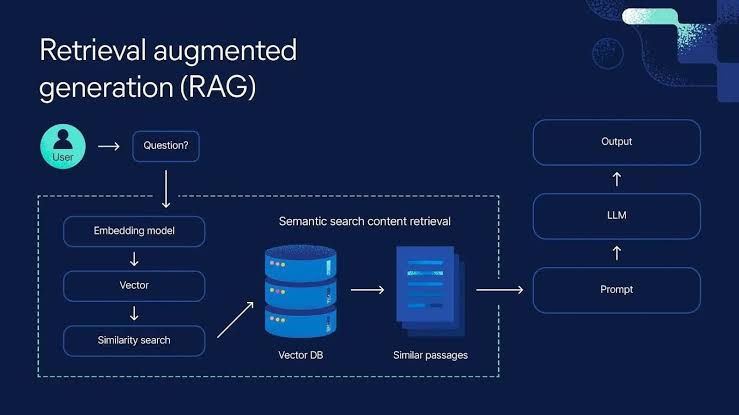
How Retrieval-Augmented Generation (RAG) Works Over Catalog Data
RAG connects two systems: a retriever that searches structured product catalog data, and a large language model (LLM) that generates answers from the retrieved content. This combination handles complex catalog queries that exceed what simple keyword search or static filters can do.
The retriever indexes catalog data — products, variants, attributes — from sources like SQL databases, Elasticsearch, or BigQuery tables. You prepare this by extracting normalized catalog records, then encoding them as vectors with a model such as OpenAI’s text-embedding-ada-002 or a domain-specific alternative. For hybrid retrieval, combine vector search with traditional keyword or attribute filtering — for example, Elasticsearch’s dense_vector field paired with a script_score query.
When a user submits a query, the retriever returns the most relevant catalog entries. A query like “men’s waterproof running shoe, size 12, blue” yields a shortlist of product and variant records, including the relevant attributes (size, color, waterproofing). The retriever’s recall depends on embedding quality, how complete the indexed attributes are, and how fresh the catalog data is. In practice, test retrieval quality by comparing returned product records directly against real user queries, especially for ambiguous or attribute-heavy searches.
The LLM receives the retrieved catalog snippets as context and generates a response grounded in those facts, resolving ambiguity or filling in missing detail. If a query omits a required variant attribute (like width), the LLM can prompt the user for clarification or infer a sensible default from catalog patterns. If product data is incomplete, it can flag that or surface partial matches instead. Unlike pure retrieval, the LLM can explain differences between variants or bridge gaps in catalog attribute data when the data allows it.
RAG enables free-text search, attribute lookup, and variant selection in a single flow. Because the LLM only generates answers from retrieved catalog content, hallucination risk drops and responses stay anchored to real product data. For every deployment, monitor retrieval logs and LLM prompts to confirm the system is consistently referencing current, accurate catalog entries.
Concrete Approaches to Variant and Attribute Retrieval with RAG
Flattening variants means treating each SKU or option (e.g., “Men’s T-shirt, Red, Size L”) as its own retrievable document. This improves recall for direct queries like “show me all red T-shirts in large,” but introduces redundancy and complicates queries about shared attributes (“all colors of this shirt”). Hierarchical representation instead models a parent product with linked variants — this preserves relationships and supports queries like “what sizes does this shirt come in?”, but can miss direct hits if the retrieval system doesn’t resolve down to variant level.
For high-accuracy retrieval, use a hybrid: index both parent and variant nodes. Tag each chunk with explicit identifiers (product ID, variant ID, attribute values) and store the relationships between them. In practice, store the variant’s full attribute set in every chunk, even if it repeats, to avoid losing context in LLM prompts.
When mapping catalog fields to retrievable chunks, avoid splitting context across chunks. Group all relevant attributes and description copy for multi-attribute products (a shoe with multiple color, size, and material options) into a single chunk per variant. For ambiguous attributes — “navy” versus “blue” — include both the catalog value and a normalized synonym field to improve match rates for natural-language queries.
Prompt engineering for RAG over catalogs needs specificity. Instead of asking the LLM to “summarize this product,” structure prompts to extract the exact attribute:
You are given a product variant with the following attributes:
Color: Navy; Size: L; Material: Cotton.
Return only the color.
To resolve color and size ambiguity, reference both attributes explicitly in the prompt and require distinct values. For compatible accessories (“show chargers that fit this laptop”), index accessory compatibility as its own retrievable field and prompt for exact matches, rather than relying on text similarity alone.
Non-standard attributes — “eco-certified,” “handmade” — need explicit mapping in the index and the prompt. If they’re missing from standard fields, extract them from descriptions and tag them during pre-processing.
Catalog size and LLM context limits set practical boundaries. Large catalogs require chunking and embedding indexes outside the LLM’s context window, and latency increases as you grow retrieval depth or chunk count. Check retrieval logs for missing or truncated attributes — if users repeatedly fail to retrieve a variant, review chunk mapping and prompt specificity before touching anything else.
Implementation Pitfalls and Privacy Considerations
RAG systems over product catalogs break when the retriever index lags behind live catalog updates. If you update inventory or pricing in your e-commerce platform but your retriever is still serving yesterday’s data, customers see out-of-stock items or wrong prices. For near-real-time accuracy, trigger retriever re-indexing directly from your catalog’s update events. Most platforms — Shopify, BigCommerce, Salesforce Commerce Cloud — offer webhooks for product and variant changes. Wire these webhooks to your indexing pipeline so catalog deltas flow through in minutes, not hours. If your retriever supports incremental updates, use them; full re-indexing is slow and error-prone.
PII leaks are a compliance risk under CCPA/CPRA and similar US state laws. Never index customer-specific data — names, emails, addresses — into retrieval stores. Catalog data should be scrubbed at the ingestion step. If you use prompt templates that dynamically inject context, validate that no customer data enters the prompt unless you have a compliant, documented reason for it. Audit your data paths: trace how catalog and session data flow from origin to retriever, and check both logs and prompt-construction code for accidental leakage. If you use third-party vendors, review their data retention and access policies for compliance gaps.
Auditability is mandatory for debugging and compliance. Log every catalog record your retriever returns to the LLM, along with the query and timestamp. Store these logs in a searchable system — Redshift, BigQuery, or even S3 with Athena — so you can reconstruct what product data was used in any customer interaction. For sensitive flows like price quotes, consider adding a record identifier to the prompt itself and logging the full prompt for traceability.
Vendor lock-in can raise costs and block future migrations. Some vector databases (Pinecone, Milvus) and LLM providers expose proprietary APIs or data formats. Before committing, test export and migration paths for your embeddings and catalog indices. If you rely on features like hybrid search or custom rerankers, confirm at least one alternative provider supports your use case, and track pricing closely — usage-based models can spike costs without warning as retrieval or generation volume scales up.

Tracking, Analytics, and Personalization with RAG-Enhanced Catalogs
RAG-driven catalogs require you to track not just which product was displayed, but which catalog chunks or passages were retrieved and shown to the user. You need to log both the retrieval context (product variant, attribute explanation, cross-sell suggestion) and the mapping between user queries and the catalog content returned. In GA4, that means custom events with parameters for retrieved_chunk_id, source_product_id, and query_text. For Meta and other ad platforms, pass these IDs through custom data fields, but confirm current parameter names in each platform’s event UI, since they change frequently.
Attribution gets more complex once the user journey passes through a RAG interface. You need to persist the identifiers for retrieved chunks or variants throughout the session, then associate them with conversion events (purchase, add_to_cart). In a GTM setup, store the relevant IDs in sessionStorage or a first-party cookie, then append them to conversion event payloads. This lets you analyze which RAG-driven content actually contributed to conversions, not just what was shown.
Personalization with RAG hinges on dynamically selecting catalog variants or attributes based on user profile data or session signals. If a user’s browsing history favors sustainable materials, your retriever can weight products or variants tagged attribute:eco_friendly higher. Capture that logic in your logging — store the personalization_criteria or scoring_features every time a RAG retrieval occurs. This enables post-hoc analysis of which signals actually drove retrieval, and whether they align with conversion lift.
Measuring RAG performance against traditional search or rule-based retrieval means tracking comparative metrics — click-through, add-to-cart, and conversion rates — segmented by retrieval strategy. Implement A/B or multi-armed bandit tests with explicit tracking of the retrieval method on each event. In GA4, use a custom dimension like retrieval_method set to RAG, search, or rules. Review funnel drop-offs and attribution paths for each variant to catch whether RAG is improving, cannibalizing, or degrading catalog engagement. If metrics flatline or regress, check for retrieval drift, poor chunk mapping, or personalization rules that overfit and narrow the catalog view.
Frequently asked questions
How do you keep a RAG system’s catalog index in sync with frequent product updates?
Use incremental indexing driven by catalog webhooks rather than scheduled full re-indexes. Real-time triggers keep price and stock data accurate; batch updates are acceptable for lower-priority attributes where a short lag is tolerable.
Can RAG handle catalogs with hundreds of thousands of SKUs?
Yes, with the right architecture. Shard the retriever index, rely on hybrid retrieval to narrow candidates before they reach the LLM, and keep the LLM’s context window focused on a small, high-relevance set of chunks rather than the full catalog.
What are the main privacy risks when using RAG over product catalogs?
The biggest risks are leaking customer queries or session data into the retrieval store, exposing sensitive catalog or pricing data to the wrong audience, and failing to log retrieval activity in a way that supports CCPA/CPRA and similar state privacy law compliance.
Not sure your tracking is telling you the truth?
Propulse Agency audits e-commerce tracking setups — server-side tagging, Meta CAPI, GA4 and consent — and fixes what is quietly costing you conversions.
Validate Your Catalog Data and Retrieval Layer Before Scaling
Start by auditing your product catalog data for consistency and completeness. RAG surfaces every missing or ambiguous attribute, so gaps in variant mappings or unstandardized fields will break downstream retrieval and frustrate users. Check attribute naming, value formatting, and variant groupings against your current product feed and search logs.
Before deploying RAG in production, run retrieval tests with real queries — especially edge cases like size and color variants and multi-attribute products. Watch for hallucinated attributes or mismatched variants; skipping this step risks inaccurate answers and analytics drift. If you use third-party LLM APIs, review your data-sharing practices against CCPA/CPRA and state equivalents, since catalog details can include sensitive business information.
